Application guide
How to get a university card
You can apply for your first university card on the page: https://user.sze.hu/
Please find below the step by step guide for university card application
Registration/Log-in:
In order to apply for a card you need to register first. If you have a user name or password you can log-in.
If you have not registered previously, you can do so by clicking onto MÉG NEM REGISZTRÁLT / NOT REGISTERED YET. After a successful registration the system sends an activating email to the email address given by you, with which you can finalise your registration.

Card application:
After log-in click on CARD / KÁRTYÁK and you can start your application.

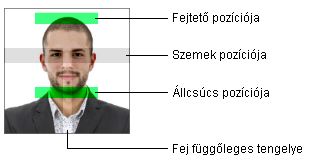
For your university card you must upload a photo:
- .jpg format
- at least in 900x1080 resolution
- Shoulder-up photo, coloured, forward facing, white background
Click on the cloud icon to start uploading.

If you have uploaded the right photo you can start the application by clicking on UNIVERSITY CARD APPLICATION / HALLGATÓI KÁRTYA IGÉNYLÉSE

In case of a successful application the status changes to applied / igényelve

If the photo is not accepted, the status changes to upload new photo / új kép feltöltésre

If the photo is accepted the status changes to active / aktív and the card will be prepared.

For full-time students, university cards can be collected during opening hours at the Student Information and Service Centre (Kisház, ÚT106).